
01
The scheduling office becomes the bottleneck
Staff re-enter appointment requests, answer availability questions, and approve routine bookings that already fit the published schedule.
Publish only the dock capacity your warehouse can handle. Carriers use a self-scheduling portal to choose an open appointment, provide the required load details, and confirm instantly when the booking matches your rules. Your team reviews exceptions—not every routine appointment.
Built for 3PLs, distribution centers, manufacturers, and warehouses coordinating inbound deliveries and outbound pickups.

Phone calls, email threads, shared calendars, and manual approval queues turn truck appointment scheduling into office work. The delay continues even when the carrier selects capacity the warehouse already approved.
Staff re-enter appointment requests, answer availability questions, and approve routine bookings that already fit the published schedule.
Spreadsheets and shared calendars rarely enforce the right building, visit type, dock capacity, equipment, or appointment duration consistently.
Missing PO, BOL, WMS, TMS, equipment, carrier, or shipment details force the warehouse to chase information before the truck reaches the gate.
thisDock combines warehouse appointment scheduling software with a carrier booking experience. Your facility controls what can be booked; carriers handle the valid routine appointments themselves.
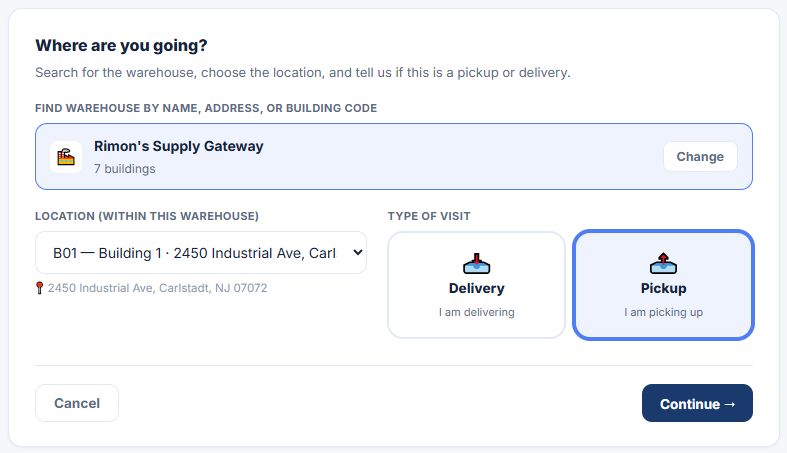
Carriers select the warehouse, building or location, and whether the visit is a delivery or pickup before viewing available appointments.
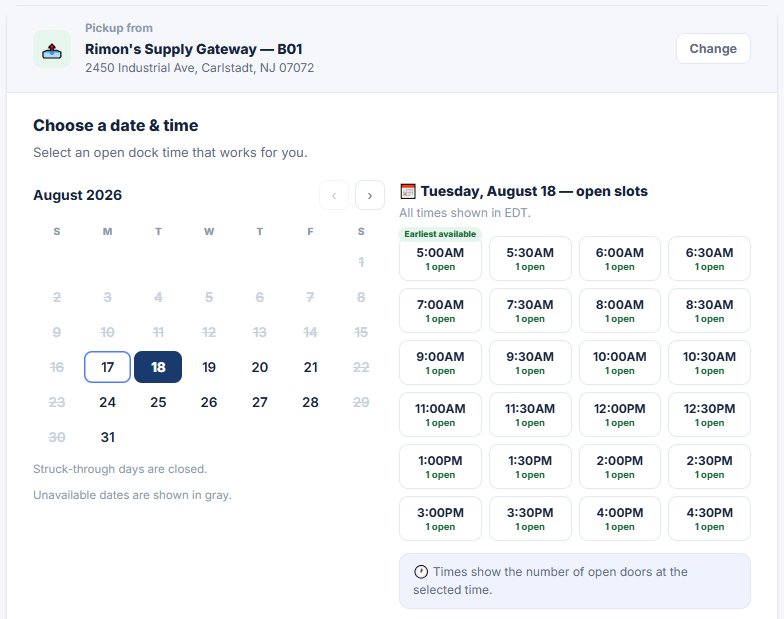
Publish dates and times around the facility’s operating hours, visit types, doors, workload, and scheduling rules—not unrestricted calendar access.
A booking that matches published capacity and facility rules is auto-approved. Conflicts and special cases remain visible for warehouse review.
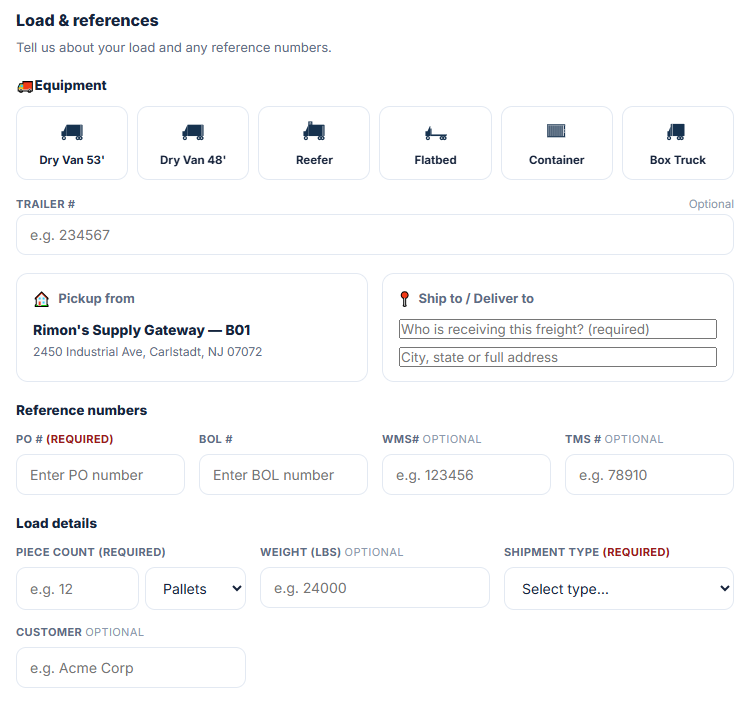
Capture equipment, trailer, PO, BOL, WMS and TMS references, piece count, weight, shipment type, customer, and destination details in the booking workflow.
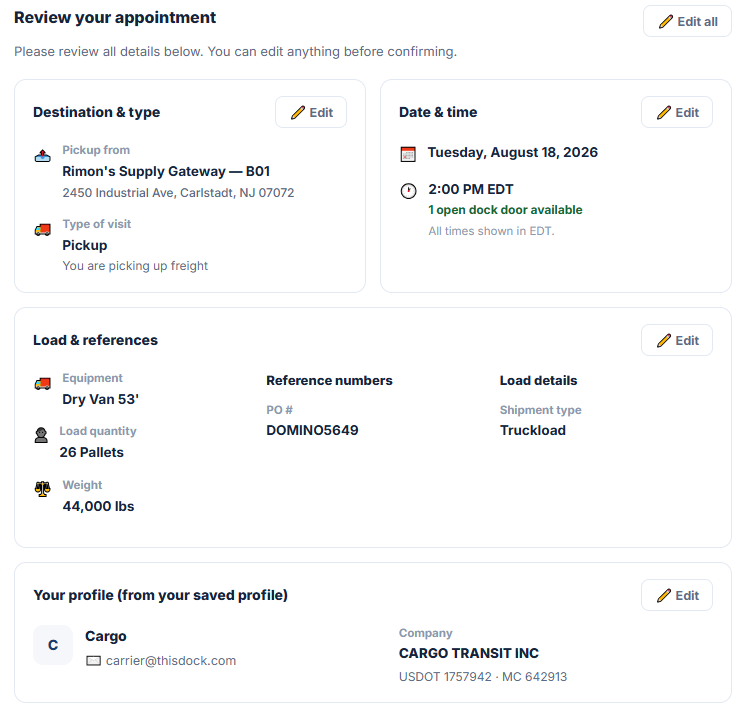
The saved carrier profile carries the company, contact, USDOT, and MC details into the review and appointment record instead of relying on re-keyed information.
Follow the same record from requested and scheduled through driver check-in, door assignment, loading or unloading, completion, and departure.
The portal guides the carrier from facility selection to an open time slot, required load information, and a final review with verified carrier details. Every image opens at full resolution.
The warehouse sets the guardrails once. Routine appointments flow onto the schedule automatically, while exceptions stay under human control.
Define facilities, visit types, operating hours, appointment windows, dock availability, and booking rules.
The carrier selects the destination, pickup or delivery type, and a date and time the facility has made bookable.
The portal collects the equipment, references, quantity, shipment, destination, and carrier profile details the warehouse requires.
Valid appointments confirm automatically. Only a conflict, restriction, or special case needs warehouse review.
The confirmed booking continues through check-in, door assignment, loading or unloading, completion, and departure.
Dock scheduling software helps warehouses plan and manage truck appointments at dock doors. It centralizes available time slots, carrier self-scheduling, rule-based confirmations, exception review, arrival status, door assignments, and visit history so teams do not have to coordinate the day through spreadsheets, phone calls, and email.
The warehouse publishes approved facilities, visit types, dates, times, and booking rules. The carrier chooses an available appointment and supplies the required load and company details. A booking that fits those rules can confirm automatically, while conflicts and special cases remain under warehouse control.
No. If a carrier selects a slot your warehouse has made available and the appointment matches your rules, thisDock can confirm it automatically. Manual review is reserved for exceptions such as conflicts, restricted loads, or special handling requirements.
Yes. thisDock displays bookable capacity based on the facility’s configured availability and rules. Once capacity is taken, it is no longer presented as an open appointment, reducing the conflicting updates that happen across spreadsheets, email, and shared calendars.
Yes. The schedule can represent both inbound deliveries and outbound pickups, including appointment time, carrier, load details, door assignment, and current operating status.
No. thisDock focuses on dock execution and can operate as a standalone system. If you already use a WMS or TMS, integration options can be discussed based on your workflow.
Yes. Facilities can organize appointments and dock activity across multiple doors and buildings, then expand the configuration as the operation grows.
Tell us how many facilities and dock doors you manage, your appointment volume, visit types, and current approval process. We’ll tailor the walkthrough to your operation.
Contact thisDock →