01
The expected carrier and arriving carrier are not compared
A confirmation number alone does not show whether the USDOT or MC information provided at arrival matches the verified carrier profile attached to the booking.
Drivers scan a facility QR code or enter their appointment booking code from any phone—no app required. thisDock retrieves the expected visit, records the arrival, and cross-references the USDOT and MC information submitted at check-in with the verified carrier profile saved during booking.
Built for 3PLs, distribution centers, manufacturers, and warehouses replacing guard-shack clipboards, office interruptions, and disconnected arrival logs.

The warehouse may already have the appointment, carrier, load, and schedule. A manual gate process asks for the same information again, creates a second version of the visit, and leaves dock and yard teams waiting for someone to relay the arrival.
A confirmation number alone does not show whether the USDOT or MC information provided at arrival matches the verified carrier profile attached to the booking.
Clipboards, intercom calls, and shipping-window conversations force staff to repeat appointment searches and re-enter details the carrier already supplied.
Delayed manual entry weakens wait-time records and keeps supervisors from seeing who arrived, who is waiting, and which load needs a door next.
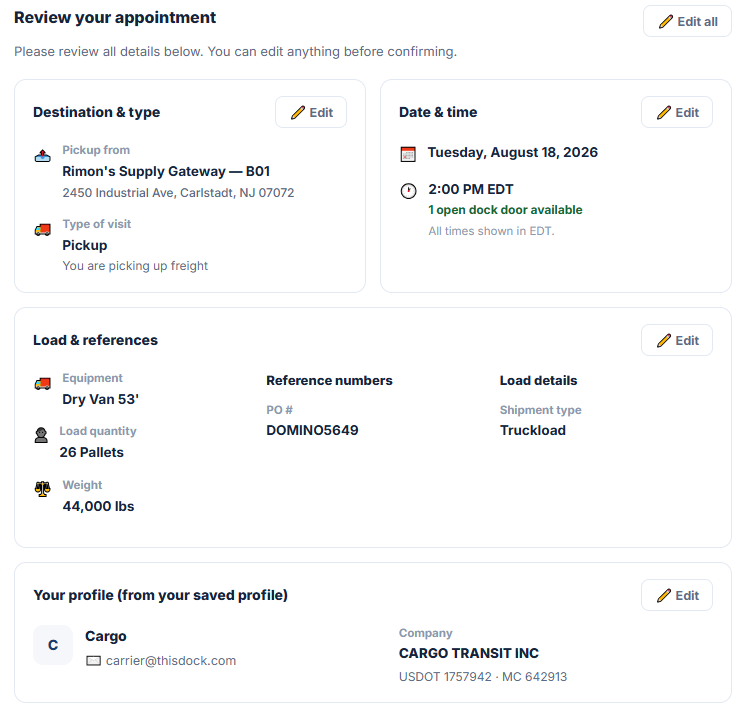
The carrier profile saved with the appointment provides the USDOT and MC details used for the later check-in comparison. The warehouse can see the destination, time, load references, shipment details, and verified company context before the driver arrives.
thisDock gives the driver a short browser workflow while preserving the appointment, carrier, arrival, communication, door, and departure history the warehouse needs.
Drivers scan with the phone camera and open the check-in workflow in the browser. There is no driver-app download or account requirement for the facility arrival.
A confirmation code links the driver to the scheduled visit and reduces repeated entry of carrier, load, destination, and appointment information.
Compare the carrier identifiers submitted at check-in with the verified carrier profile retained during booking and make mismatches visible for warehouse review.
Create a clean arrival timestamp and show checked-in drivers, linked loads, wait duration, carrier status, and door assignment in one operational view.
Drivers who explicitly opt in can receive operational SMS messages such as check-in confirmation, door-ready instructions, appointment changes, and load-status updates.
When a scheduled carrier is late, thisDock can email the carrier with the warehouse team copied so the delay and follow-up remain connected to the appointment.
Driver check-in is more useful when it updates the same operational record used for the appointment, shipment, door, trailer, and departure. Configured integrations can exchange that context with connected systems.
Link the driver, carrier, confirmation code, load references, facility, appointment time, and arrival event instead of creating a separate gate log.
Use the arrival status to support door assignment, live-load activity, drop-trailer workflows, yard visibility, driver communication, and departure history.
When the connected provider exposes the required interface, check-in and visit events can participate in WMS, TMS, API, or EDI workflows configured for the operation.
Integration scope depends on each provider’s available API or EDI support, the data exchanged, and the warehouse workflow being automated.
The normal arrival moves quickly. Missing appointments and carrier mismatches remain visible as exceptions instead of silently entering the operation.
The driver opens the browser workflow from the facility QR code and retrieves the scheduled visit with its confirmation code.
Collect the facility-required driver, phone, carrier, USDOT or MC, trailer, load, and visit information.
Compare the carrier identifiers supplied at arrival with the verified profile retained on the booking.
Record the arrival time and add the linked visit to the live driver queue, while surfacing inconsistent information for review.
Send the driver to the correct door or yard workflow, communicate operational updates, and preserve the activity through check-out.
Warehouse driver check-in software replaces paper arrival logs with a structured digital workflow. It can retrieve an appointment, capture driver, carrier, trailer, and load details, timestamp arrival, place the visit in a live queue, support door communication, and preserve the activity through departure.
No. Drivers can scan a facility QR code with the phone camera and complete the workflow in a mobile browser. No driver app or account is required for routine check-in.
Yes. The booking code retrieves the expected appointment so the driver can confirm the required arrival details without rebuilding the visit from the beginning.
thisDock cross-references the USDOT and MC information submitted at check-in with the verified carrier profile saved during booking. A matching arrival can proceed normally, while inconsistent details become visible to the warehouse team for review.
The workflow described on this page verifies carrier context by comparing USDOT and MC information with the booking. It should not be interpreted as government-issued driver-ID validation unless that separate capability is explicitly included in the customer’s configured implementation.
Yes. Drivers who explicitly opt in can receive operational SMS notifications such as check-in confirmation, door assignments, appointment instructions, delays, and load-status updates. SMS consent is optional and separate from check-in.
Yes. When a scheduled carrier is late, thisDock can send an update email to the carrier and copy the warehouse team, keeping the delay communication connected to the appointment record.
Yes. A facility QR code and browser-based workflow can capture routine arrivals without requiring every check-in to begin at a staffed desk or guard shack. The warehouse can still review exceptions and control entry according to its operating rules.
Tell us how drivers arrive today, which fields you require, how appointments are identified, how late and unscheduled trucks are handled, and what dock or yard teams need to see. We’ll tailor the demonstration to your gate workflow.
Contact thisDock →