
01
Freight floats between customer locations
One LTL carrier may collect pallets for several customers or POs. Without a shared carrier pool, those pallets remain separate pieces of work scattered across the building.
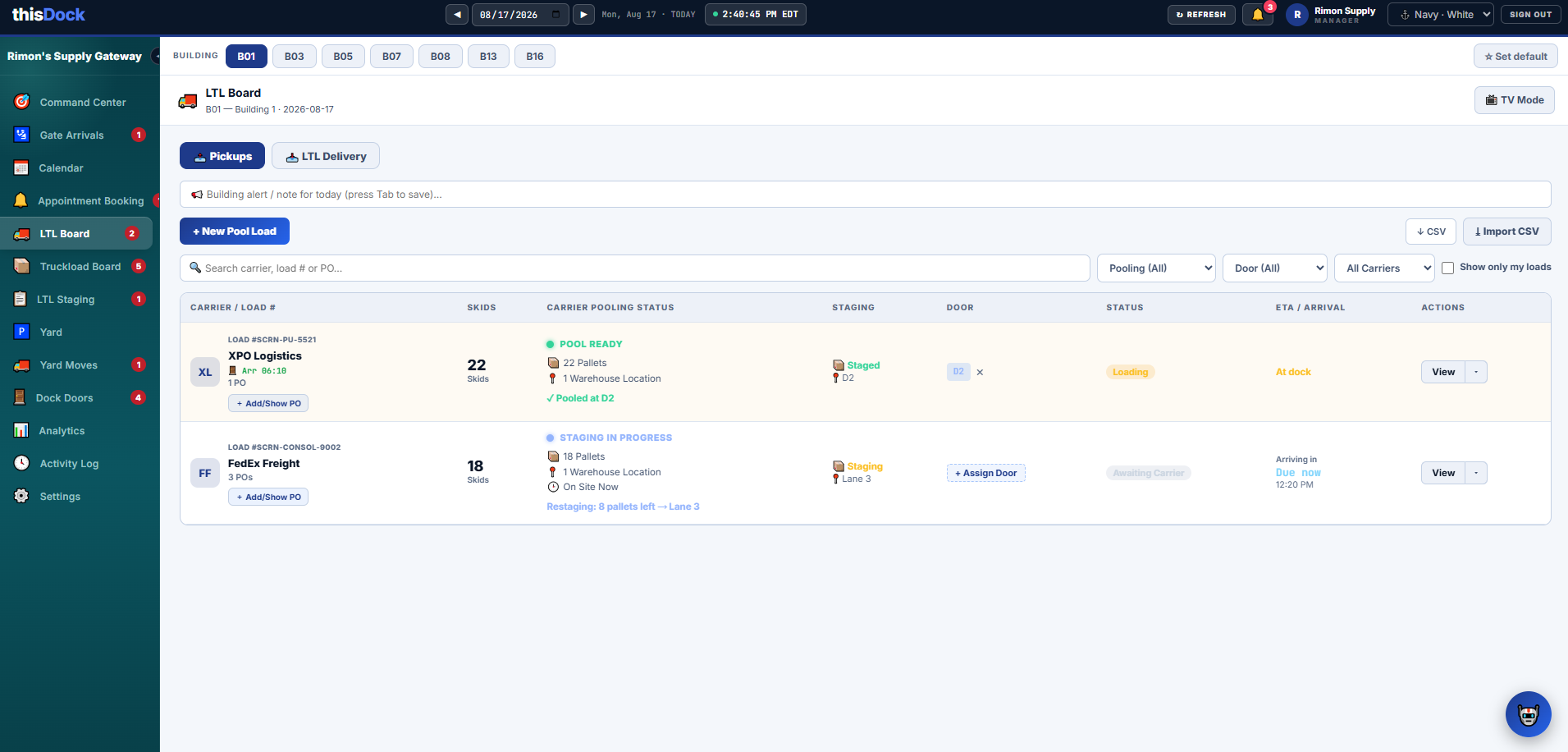
Turn freight from multiple customers, orders, and warehouse locations into one carrier-ready staging pool. thisDock shows what is expected, what is staged, what is still missing, where the pool is located, and which dock door will load it.
Built for LTL-heavy 3PLs, distributors, manufacturers, and multi-customer warehouses coordinating frequent carrier pickups.
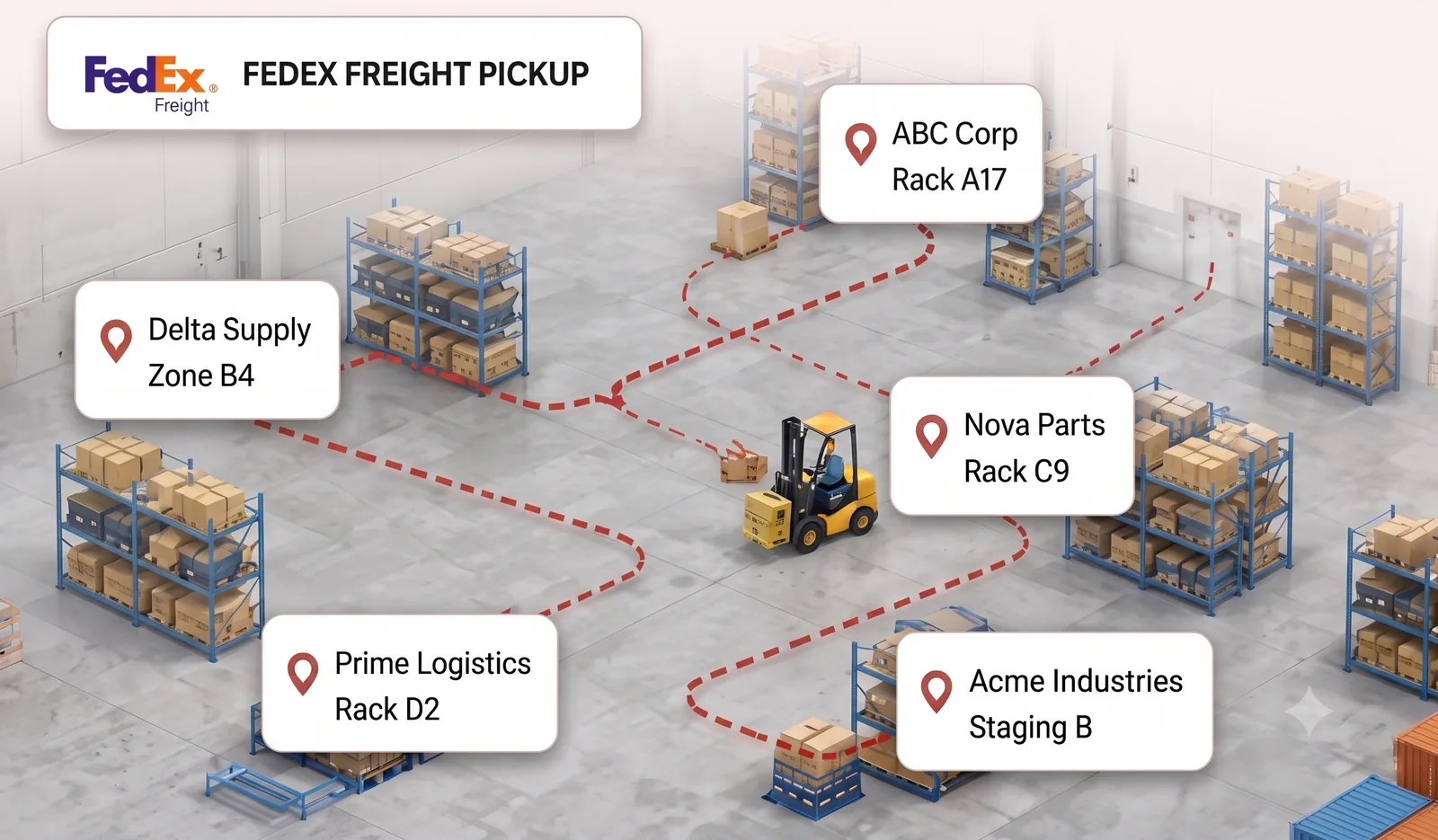
LTL freight can quickly become floating inventory: physically inside the building, but not clearly tied to its carrier pool, staging lane, dock door, or remaining workload. A WMS may know where each order is stored, while the dock team still has to assemble the carrier’s complete pickup across customers, POs, aisles, and staging areas.
One LTL carrier may collect pallets for several customers or POs. Without a shared carrier pool, those pallets remain separate pieces of work scattered across the building.
A schedule may show one pickup, but that pickup could still require several forklift trips and pallets from multiple locations. Spreadsheets and radio calls do not expose that work clearly.
The gap becomes obvious only when the carrier arrives. Forklifts start searching, the door stays occupied, and supervisors cannot give a confident loading status.
Without carrier pooling, one scheduled pickup can hide pallets spread across customers, orders, racks, and staging areas. thisDock turns those separate pieces into one measurable workload: expected pallets, staged pallets, remaining freight, a physical staging location, and the door that will load it. Open either illustration at full resolution.
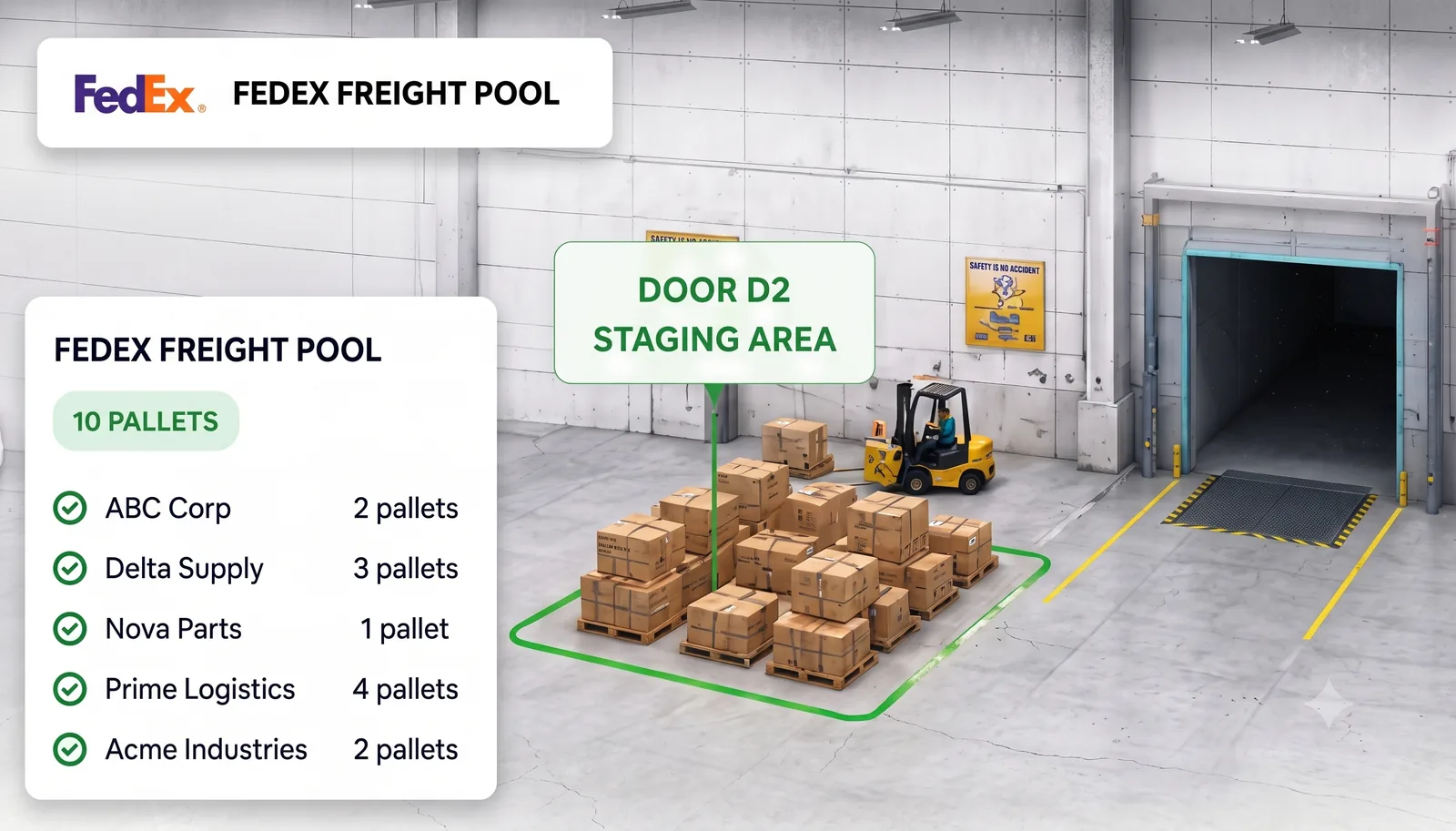
thisDock adds the dock-execution layer between warehouse inventory and the arriving carrier. Teams build the pickup during the shift, expose exceptions early, and connect the ready pool to the correct door.
Create a pool load by carrier and keep the contributing load, PO, and shipment references visible inside the same operational record.
Track skid or pallet totals, completed staging, remaining freight, and the current pooling status before the carrier reaches the facility.
Assign the freight to a warehouse location, staging lane, zone, or door so operators know where to build and retrieve the pickup.
Assign the pool to a door and keep staging readiness, loading status, and the carrier’s arrival context together instead of coordinating them on separate boards.
Use ETA and arrival status alongside staging progress so the team can prioritize the pool that will affect the dock next.
Find loads by carrier, load number, or PO; filter by pooling state, door, and carrier; and use CSV tools when a file-based workflow is required.
thisDock can operate as the dock team’s execution view while configured API, EDI, WMS, or TMS connections exchange the shipment facts needed to build and close each carrier pool.
Use available WMS data to associate customer orders, PO references, shipment quantities, and supporting records with the carrier pickup.
Configured TMS, API, or EDI workflows can connect carrier, load, appointment, and status information to the dock operation.
The implementation can use an available API, supported EDI transaction, or agreed file exchange based on the systems and data involved.
Integration scope depends on the connected provider’s available API, EDI support, data quality, and the workflow your operation wants to automate.
The warehouse builds and verifies the carrier pool before arrival, then uses the same record to coordinate the door and loading status.
Start the carrier pickup and add the load, PO, shipment, and expected pallet or skid information.
Choose the lane, zone, warehouse location, or dock-side area where operators will assemble the freight.
Record what has reached the pool and keep the remaining quantity visible while the shift is still working.
Find missing freight, verify the expected quantity, and move the pool from staging in progress to pool ready.
Match the ready freight to the arriving carrier and assigned dock door, then follow it through loading and completion.
LTL staging software helps a warehouse organize freight for less-than-truckload carrier pickups. It groups the contributing orders or POs into a carrier-level pool, tracks expected versus physically staged pallets, assigns a staging location, and shows whether the pickup is ready before the truck reaches the dock.
A carrier pool is the combined freight a specific carrier is expected to collect during a pickup. It can contain pallets from multiple customers, orders, or warehouse locations while preserving the references and quantities behind each part of the load.
Yes. A pool load can organize multiple contributing PO or shipment references under the carrier pickup so the dock sees the complete load while retaining the underlying order context.
The LTL board keeps expected pallet or skid quantities, staging progress, remaining freight, physical staging location, pooling status, dock assignment, and carrier arrival context together. This makes an incomplete pool visible before loading begins.
Yes. The LTL operating view supports separate pickup and delivery workflows so teams can distinguish outbound carrier pools from inbound LTL activity while coordinating the same facility and doors.
No. A WMS remains responsible for inventory and warehouse transactions. thisDock provides the carrier-pooling, dock-staging, arrival, door, and execution view needed to coordinate the physical pickup across those records.
Yes, when the connected system provides the required interface and data. thisDock can support configured API, EDI, or file-based workflows for order references, expected quantities, carrier and load details, appointment context, documents, and operational status. Integration scope is confirmed for each implementation.
Tell us how many LTL pickups, carriers, customers, facilities, dock doors, and pallets your team coordinates—and where the current process loses visibility. We’ll tailor the demonstration to your floor and integration workflow.
Contact thisDock →